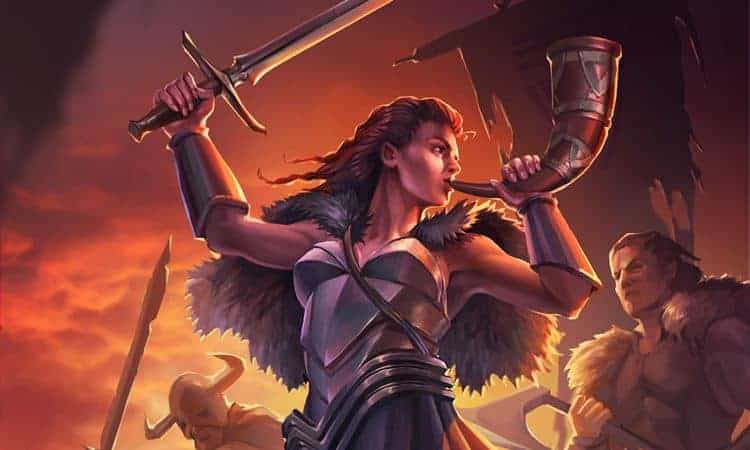
What is GU?
Gods Unchained (GU hereinafter) is a Trading Card Game (TCG or Trading Card Game in English) developed by the Australian company Immutable. GU is betting on blockchain technology to generate unique digital assets (NFTs, which are the initials of "Non-Fungible Tokens" in English). By the way, if you are wondering what a Fungible Token is, it is one that can be used as a means of payment (i.e., a cryptocurrency). Non-Fungible Tokens are not means of payment.
Today is in BETA, which means that its functionality is not complete.
How do I start playing GU? What steps should I take? Is there a tutorial?
Of course, you can always use the official tutorial in English (you will find it in the GU client itself). However, Animokaiman has developed the following Tutorial in Spanish to start from scratch (create an account, get started, etc.):
Is GU available in Spanish?
GU is currently only available in English. It is expected to be available in other languages in the future, including Spanish.
Can I play GU for free?
In analogue trading card games, in which the cards were printed, it was essential to make a financial outlay to play: it was necessary to buy card packs to create decks. However, with GU this is not the case and You can play for free.
Every new player receives the Welcome Collection (Welcome Set) and, like all GU players, novices and veterans, can get cards from another set, the Core Set, by playing. As we will see later, those cards only exist in the game, they are not linked to the Ethereum blockchain (i.e. they cannot be bought or sold). When the time comes, we'll take a closer look at this issue, explaining the differences between NFT and non-NFT cards, as well as GU's economic ecosystem.
As it is a game Play and Earn (P&E), i.e., that allows you to earn income by playing, your achievements in GU will translate into rewards that will allow you to access other assets in its universe (including cards from expansions) with economic value.
Finally, it should be clarified that when I refer to the concept of "asset" I do so from an economic point of view, understanding it as a resource with value that is likely to generate a future benefit.
Is GU Pay to Win?
This is a controversial issue. As in all trading card games, Having a collection of cards that is as complete as possible translates into multiple advantages. This is a fact.
As we have already seen, it is possible to play GU for free. However, it is true that to compete at a high level with guarantees of success, as in any trading card game, It is essential to have a wide collection of cards.
Having said all of the above, it is necessary to make an important clarification: the GU team has reiterated on multiple occasions that its commitment is that the fact that a player invests money to expand his collection of cards should not translate into him achieving victories "automatically". In other words, one of the objectives of the Immutable team is that GU does not become a "pay to win" game (Pay to Win or, for short, p2w).
What platforms is GU available on? Can I play using my smartphone? What are the minimum system requirements to install the game?
GU is available for Microsoft Windows and for Apple macOS. We know that there are also players on Linux, although it does not have official support (see: "Guide – How to play in Linux").
It has a version for Android and IOS mobile devices, but with limited functionality.
We are not aware that there is any official information about the System Requirements to install and run the GU client smoothly, but you don't need a state-of-the-art computer.
Is playing with multiple accounts on the same device allowed?
No, the Multi-account is not allowed. Remember that GU is a p&e game and preventing fraudulent behavior is a priority for the Immutable team.
Is playing with different accounts on different devices sharing the same internet connection allowed?
Yes, it is admitted. Before, it was necessary Fill in a form, but today the Immutable team contacts the accounts in which they detect strange behavior sending them the aforementioned form. Remember that GU is a p&e game and preventing fraudulent behavior is a priority for the Immutable team.
I'm installing the GU client (or an update) and the process doesn't finish, it's "stuck" at 99%, what can I do?
Is this the first installation (Official Instructions)? So don't forget that, sometimes, firewalls, VPNs, or antivirus software can interfere in the process.
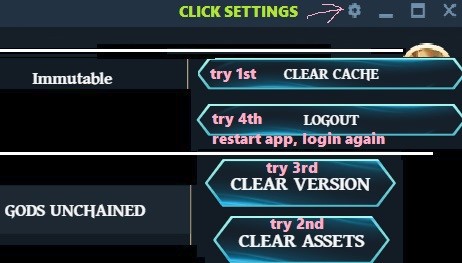
Whether it's a first installation of the game client or the installation of an update, you can try the following steps:
- First, go to "Options" and try Flush the cache (see question "How do I flush the GU client cache?").
- Second, try Emptying assets or "assets"; If nothing changes, try Clean up the current version (see question "How do I clean up assets and the current version of the GU client?").
- Third, try Log out of your user session and log back in.
If none of the above works, you are left with the option to uninstall the game client and Delete the following folders before reinstalling it From scratch:
C:\Users\User\AppData\Local\GodsUnchained
C:\Users\User\AppData\Local\Programs\immutable-launcher
C:\Users\User\AppData\Roaming\immutable-launcher
C:\Users\User\AppData\LocalLow\FuelGames
C:\Users\User\Documents\My Games\GodsUnchained
Finally, a summary of all of the above graphically (Image source: unknown):
If none of the above has worked, the best thing to do is to contact support (see question "Do I need help, what do I do?").).
How do I flush the GU client cache?
Sometimes it can be useful to force the synchronization of the GU client (the program installed on your computer that you use to play GU) with the information that Immutable has on its servers about your user account. The way to do this is Flush the cache of the game client.
To do this you just need to click on the cogwheel that you will find in the upper right corner of the customer's home screen to open the next one. menu:
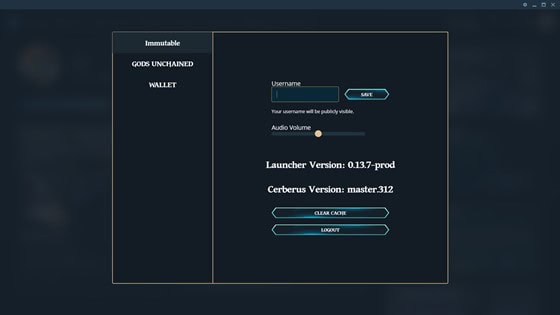
Click on "Clear cache" and that's it.
How do I clean up the assets and the current version of the GU client?
Click on the cogwheel in the top right corner of the customer's home screen to open the following menu:
Now do click on "GODS UNCHAINED" and you'll see the following screen:

Click on "Clear Assets" or "Clear version", as you prefer, and let the client restart.
What is a cryptocurrency wallet (or purse)? What is Metamask for?
Wikipedia defines cryptocurrency wallet as "device, a physical medium, a program, or a service that stores the public and/or private keys for cryptocurrency transactions." In short, it is a Digital Asset Storage Solution and each wallet has a unique identifier (ID).
All of your Gods Unchained NFT assets are stored in your wallet (as long as you've linked it to the game, of course). Since GU uses the Ethereum blockchain to manage assets, the recommended wallet is Metamask.
As Wikipedia indicates (see "Metamask"), MetaMask "is a cryptocurrency software, which installed as an extension of a web browser, is used to interact with the blockchain platform, Ethereum". It is free and through its web browser extension it will allow you to interact very easily with the Ethereum network. With this extension, you can set up a wallet and link it to GU to make purchases, log in, and store your in-game assets.
Remember that all your GU assets will be stored in your Metamask wallet... Here are some Good security practices (to avoid unpleasantness).
- The most important thing: Keep your private keys safe (also known as a "seed phrase"). It's the only way to recover your assets in case your device isn't accessible, so it's a good idea to have a backup.
- Never reveal your private keys to anyone, unless you want to provide full control over your assets.
How do I create my Metamask wallet and link it to GU?
It's a simple process, don't worry. Let's take a look Step by step (as explained by the official information provided by GU):
- Visit the official website of Metamask (MetaMask.io).
- Install its browser extension on the web browser of your choice.
- Create a portfolio: Follow the instructions to "Create a portfolio".
- Connect the extension: Log in to the official GU website with your game account. If you're logged in to Metamask in your browser extension, you'll be shown a connection request (which you have to accept, of course).
- Link your portfolio: Go to the portfolio management section of the GU website by clicking on your profile picture in the top right. Click the "Add Portfolio" button.
Important: linking your wallet to GU does not give Immutable any control over it, just to let GU know which assets belong to you so you can use them (in-game or in the marketplace).
How can I keep up to date with GU news?
Immutable offers, among others, the following Official channels:
- Server on Discord.
- Newsletter.
- Reddit page.
- Etc.
The best way to stay on top of what's new is subscribe to the #Announcements and #Status-updates channels of the GU server on Discord. Remember that you also have a specific URL available for incidents.
You'll find those links (and many others) in the "Resources" from this same website. As is evident, the GU Masters newsletter is a must-readHave you already subscribed to The Herald?
How do I find out my Player ID (or Apollo ID) in Gods Unchained?
Your Player ID corresponds to a Unique identifier which is generated at the time a new player account is created. There are several ways to find out this number, but today the easiest is to search for your profile in gudecks.com (it's as easy as searching for your username in the "Player Stats" section, within "Meta") and look at the url. At the end of it you will see a number... that's your Player ID.
If you recently created your account, you may not be able to find yourself on GUDecks by your username yet. In that case, just when you finish a game, look for your opponent and you can find them on their profile. From there you just have to click on your name and you will land on your own profile, where you can find your Player ID.
What level am I?
The levels are unlimited, You can check yours in the game client:

What ranking do I have?
The ranking of players at GU is distributed as follows: Categories:
- Rusted Bronze
- Purified Bronze
- Rusted Iron
- Purified Iron
- Impact Meteorite
- Astral Meteorite
- Twilight Shadow
- Midnight Shadow
- Auric Gold
- Solar Gold
- Ethereal Diamond
- Mythic
When am I going to stop being "Novice"?
Your "title" does not depend on your level or your ranking, but rather depends on your NFT card collection. To be exact, how many cards you have from expansions (like Genesis and TOTG). At the moment it has been updated once per expansion.
PTR? What is that?
PTR corresponds to Public Test Realm and it is the Game sandbox. Currently all players have access (except for those who have just created their account when PTR is enabled), but it is only available when the GU team announces it. The easiest way to know when it will be available is to follow the #Announcements channel of the official GU server on Discord.When the PTR is available you will be able to access via: "Settings" (cogwheel top right) > "Gods Unchained" > "Branch" (see screenshot).
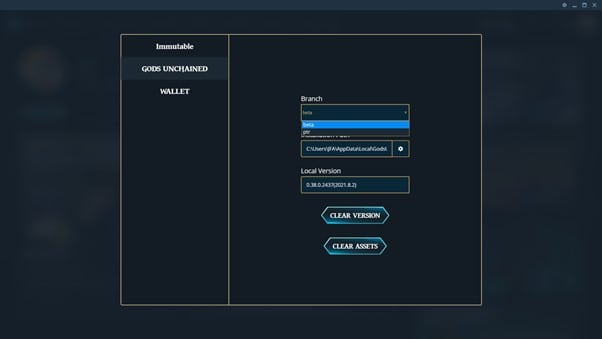
When you choose PTR, you'll have to log in again and almost certainly wait for an update to the game client to install. Activity that takes place in the PTR is not retained in normal game mode (No ranking, no rewards, nothing). It's just a sandbox.
Also note that there are a couple of channels on the official GU server on Discord for Provide feedback About the experience in the PTR:
- #ptr-feedback
- #ptr-help-and-bugs
What can I do to improve my skill in the game? How do I know which cards I would like to add to my collection?
There is no universal answer for this question. The best answer for you will depend on factors such as your experience in this type of game, your goals, your investment capacity, etc.
A priori, and before making hasty decisions when it comes to allocating money to the acquisition of cards, it seems advisable that you start with play with all the gods and, as far as possible, with the different existing archetypes to familiarize yourself with the mechanics of the game and the different strategies at your disposal.
It will also help you Learn from experienced players, taking advantage of the fact that many of them generate content for beginners (you will find some in the "Links" section). You will find multiple options (especially in English).